i2.multi_object
A few fundamental tools to operate on a fixed collection of objects (e.g. functions).
For functions you have:
Pipe: To compose functions (output of one fed as the input of the next)FuncFanout: To apply multiple functions to the same inputsFlexFuncFanout: LikeFuncFanoutbut where the application of inputs is flexible.
That is, the functions “draw” their inputs from the a common pool, but don’t choke if there are extra unrecognized arguments.
ParallelFuncs: To make a dict-to-dict function, applying a specific function for each input key (putting the result in that key in the output.
For context managers you have:
ContextFanout: To hold multiple context managers as one (entering and exiting together)
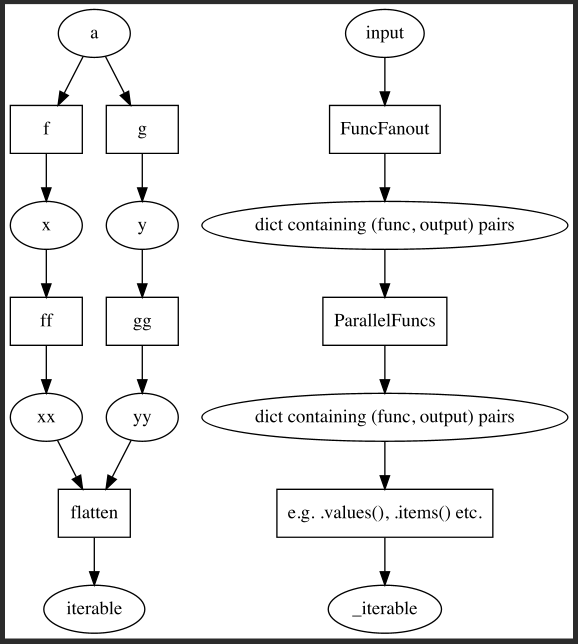
Functions
Assert that the input is an iterable of callables, or wrap a single callable in an iterable. |
|
|
Unravel nested Pipes to get a flat 'sequence of functions' version of input. |
Raise |
|
|
To merge unnamed and named arguments into a single (named) dict of arguments |
|
Tries to find the (or "a") name for an object, even if |
|
Determine if two pipelines are equal. |
|
Return a string with a limited length. |
|
Generate (name, object) pairs from an iterable of objects |
Classes
|
Encapsulates multiple objects into a single context manager that will enter and exit all objects that are context managers themselves. |
|
Call multiple functions, using a pool of arguments that they will draw from. |
|
Applies multiple functions to the same argument(s) and returns a dict of results. |
|
A |
|
A base class that holds several named objects |
|
Make a multi-channel function from a {name: func, ...} specification. |
|
Simple function composition. |
- class i2.multi_object.ContextFanout(*unnamed, **named)[source]
Bases:
MultiObjEncapsulates multiple objects into a single context manager that will enter and exit all objects that are context managers themselves.
Context managers show up in situations where you need to have some setup and tear down before performing some tasks. It’s what you get when you open a file to read or write in it, or open a data-base connection, etc.
Sometimes you need to perform a task that involves more than one context managers, or even some objects that may or may not be context managers. What
ContextFanoutdoes for you is allow you to bundle all those (perhaps) context managers together, and use them as one single context manager.In python 3.10+ you can bundle contexts together by specifying a tuple of context managers, as such:
with (open('file.txt'), another_context_manager):
    ...
But
Python will complain if one of the members of the tuple is not a context manager.
A tuple of context managers is not a context manager itself, it’s just understood by the with (in python 3.10+).
As an example, let’s take two objects. One is a context manager, the other not.
>>> from contextlib import contextmanager
>>> @contextmanager
... def some_context_manager(x):
...     print('open')
...     yield f'x + 1 = {x + 1}'
...     print('close')
...
>>> def not_a_context_manager(x):
...     return x - 1
...
>>> c = ContextFanout(not_a_context_manager, some_context_manager(2)) >>> list(c) ['not_a_context_manager', '_GeneratorContextManager']The name (chosen by
MultiObj.auto_namer) ‘_GeneratorContextManager’ isn’t the best. Let’s give an explicit name:>>> c = ContextFanout(not_a_context_manager, context=some_context_manager(2)) >>> list(c.objects) ['not_a_context_manager', 'context']See from the prints that “with-ing” c triggers the enter and exit of ‘context’
>>> with c:
...     pass
open
close
- class i2.multi_object.FlexFuncFanout(*unnamed_funcs, **named_funcs)[source]
Bases:
MultiFuncCall multiple functions, using a pool of arguments that they will draw from.
>>> from i2.tests.objects_for_testing import formula1, sum_of_args, mult, add
>>> mf1 = FlexFuncFanout(formula1=formula1, mult=mult, add=add)
>>> kwargs_for_func = mf1.kwargs_for_func(w=1, x=2, z=3, a=4, b=5)
What’s this for? Well, the raison d’etre of
FlexFuncFanoutis to be able to do this:>>> assert add(a=4, b=5) == add(**kwargs_for_func['add'])This wouldn’t work on all functions since some functions have position only arguments (e.g.
formula1). ThereforeFlexFuncFanoutholds a “normalized” form of the functions; namely one that handles such things as postion only and varargs.Not yet working (to do; right now it raises
TypeError: formula1() got some positional-only arguments passed as keyword arguments: 'w'):# >>> assert formula1(1, x=2, z=3) == mf1.normalized_funcs[formula1](**kwargs_for_func[formula1])Note
In the following, it looks like
FlexFuncFanoutinstances return dicts whose keys are strings. This is not the case.The keys are functions: The same functions that were input. The reason for not using functions is that when printed, they include their hash, which invalidates the doctests.
# >>> def print_dict(d):  # just a util for this doctest
# ...     from pprint import pprint
# ...     pprint({k.__name__: d[k] for k in sorted(d, key=lambda x: x.__name__)})
>>> mf1 = FlexFuncFanout(formula1, mult=mult, addition=add) >>> assert mf1.kwargs_for_func(w=1, x=2, z=3, a=4, b=5) == { ... 'formula1': {'w': 1, 'x': 2, 'z': 3}, ... 'mult': {'x': 2}, ... 'addition': {'a': 4, 'b': 5}, ... }Oh, and you can actually see the signature of kwargs_for_func:
>>> from inspect import signature
>>> signature(mf1)
<Sig (w, x: float, a, y=1, z: int = 1, b: float = 0.0)>
>>> mf2 = FlexFuncFanout(formula1, mult, addition=add, mysum=sum_of_args) >>> assert mf2.kwargs_for_func( ... w=1, x=2, z=3, a=4, b=5, args=(7,8), kwargs={'a': 42}, extra_stuff='ignore' ... ) == { ... 'formula1': {'w': 1, 'x': 2, 'z': 3}, ... 'mult': {'x': 2}, ... 'addition': {'a': 4, 'b': 5}, ... 'mysum': {'args': (7, 8), 'kwargs': {'a': 42}}}
- class i2.multi_object.FuncFanout(*unnamed_funcs, **named_funcs)[source]
Bases:
MultiFuncApplies multiple functions to the same argument(s) and returns a dict of results.
You know how
map(func, iterable_of_inputs)applies a same function to an iterable of inputs.FuncFanout(we could call itpam) is a sort of dual; used to apply multiple functions to a same input.>>> def foo(a): ... return a + 2 ... >>> def bar(a): ... return a * 2 ... >>> groot = lambda a: 'I am groot' >>> m = FuncFanout(foo, bar, groot) >>> >>> list(m(3)) [('foo', 5), ('bar', 6), ('_2', 'I am groot')] >>> dict(m(3)) {'foo': 5, 'bar': 6, '_2': 'I am groot'}Don’t like that
_2name? Well, If you specify names to the input functions, they’ll be used instead of the ones found by theMultObj.auto_namer.>>> m = FuncFanout(foo, bar_results=bar, groot=groot) >>> dict(m(10)) {'foo': 12, 'bar_results': 20, 'groot': 'I am groot'}Or if you want your results as a tuple, you could do:
>>> tuple(dict(m(10)).values())
(12, 20, 'I am groot')
The above, gather in a
dictis one way to get your data, but what calling aFuncFanoutinstance actually gives you is a generator that yields the(func_key, func_output)pairs one at a timeSometimes you may want/need more control though, and prefer to iterate through the pairs yourself, and in that case use
call_generatordirectly.>>> gen = m(10) >>> next(gen) ('foo', 12) >>> next(gen) ('bar_results', 20) >>> next(gen) ('groot', 'I am groot')So this gives you control on how you want your data. Here’s a recipe: Say you want to make a function that gives you the data as a dict automatically. You can do this, using
i2.Pipe:>>> f = Pipe(m, dict) >>> f(10) {'foo': 12, 'bar_results': 20, 'groot': 'I am groot'}Or if you want a tuple:
>>> from operator import itemgetter, methodcaller
>>> from functools import partial
>>> f = Pipe(m, partial(map, itemgetter(1)), tuple)
>>> f(10)
(12, 20, 'I am groot')
- class i2.multi_object.MultiFunc(*unnamed_funcs, **named_funcs)[source]
Bases:
MultiObjA
MultiObjthat only accepts callables; the base ofPipe,FuncFanoutand friends.>>> mf = MultiFunc(len, up=str.upper) >>> list(mf) ['len', 'up'] >>> mf.up("a") 'A' >>> MultiFunc(len, 3) Traceback (most recent call last): ... TypeError: These were not callable: [3]- property funcs
Alias of .objects, for better readability in the context of MultiFunc
- class i2.multi_object.MultiObj(*unnamed, **named)[source]
Bases:
MappingA base class that holds several named objects
>>> from functools import partialLet’s make a
MultiObjwith some miscellaneous objects. (Note thatMultiObjwill usually be used for specific kinds of objects such as callables or context managers. Here we chose the objects to demo what the auto-naming does.)>>> mo = MultiObj([1], [1, 2], partial(print, sep=","), i='hi', ident=lambda x: x)You now have a mapping and can do mapping things such as being able to list keys, getting the length, seeing if a key is present, and getting the value for a key.
Note that the first and second list cannot be assigned the same name without creating a conflict. In general one of the following will happen: -you give it a name -it tries to figure out a non conflicting name (if the object has a dunder name, etc) -it falls back to a naming that is just the stringification of the argument’s positional index
>>> list(mo) # not that the second item cannot be 'list', so a different name is given
['list', '_1', 'print', 'i', 'ident']
>>> len(mo)
5
>>> mo['_1']
[1, 2]
>>> 'list' in mo
True
>>> 'not a key of mo' in mo
False
When a key (always a string) is also a valid identifier, and in-so-far as it doesn’t clash with other attributes,
MultiObjwill also give you access to the names/keys of your objects via attributes. (Note, this is similar to whatpandas.DataFramedoes with it’s columns names.)>>> mo.list [1] >>> mo.print functools.partial(<built-in function print>, sep=',')You can also specify an object mapping directly through a mapping:
>>> mo = MultiObj({'this': [1], 'that': [1, 2]})
>>> dict(mo)
{'this': [1], 'that': [1, 2]}
You can specify an instance name and/or doc with the special (reserved) argument names
__name__and__doc__(which therefore can’t be used as object names:>>> mo = MultiObj( ... this=[1], that=[1, 2], __name__='this_and_that', __doc__='Nothing much' ... ) >>> dict(mo) {'this': [1], 'that': [1, 2]} >>> mo.__name__ 'this_and_that' >>> mo.__doc__ 'Nothing much'- static auto_namer(exclude_names=(), obj_to_name=<function name_of_obj>, *, name_for_position=())
Generate (name, object) pairs from an iterable of objects
- Parameters:
>>> from functools import partial
>>> objects = [map, [1], [1, 2], lambda x: x, partial(print, sep=",")]
>>> g = uniquely_named_objects(objects)
>>> names_and_objects = dict(g)
>>> list(names_and_objects)
['map', 'list', '_2', '_3', 'print']
That
'_2'is there because both[1]and[1, 2]would be named'list', so to avoid that, a default name (revealing the position of the object in the inputobjects) is given. The ‘_3’ comes from the fact that thelambdafunction doesn’t have a proper name (one that is a python identifier).If we wanted the name for
[1]to revert to the default positional name'_1', we can achieve this by forbidding the name'list':>>> list(dict(uniquely_named_objects(objects, exclude_names={'list'}))) ['map', '_1', '_2', '_3', 'print']You could also acheive this by specifying this
'_1'explicitly in thename_for_positionargument:>>> list(dict(uniquely_named_objects(objects, name_for_position={1: '_1'}))) ['map', '_1', 'list', '_3', 'print']The reason this
listreappears as a name is that we didn’t exclude it, and the name is not taken by the[1]argument anymore. To get the desired effect withname_for_positionwe could therefore do this:>>> list(dict(uniquely_named_objects(objects, name_for_position={1: '_1', 2: '_2'}))) ['map', '_1', '_2', '_3', 'print']Obviously,
exclude_namesis the right argument for the problem above, but whatname_for_positiondoes give you is the ability to explicitly chose the names you want to assign to all or some of the elements of your iterable.>>> list(dict(uniquely_named_objects( ... objects, name_for_position={1: 'first_list', 2: 'second_list', 3: 'lambda'})) ... ) ['map', 'first_list', 'second_list', 'lambda', 'print']Extra notes:
See what
uniquely_named_objectsoffers as parametrization:You can provide an exclusion list (though the handing of a conflict is hardcoded and questionable)
You can provide a
obj_to_namefunction to control the naming of objects.
One trick to be aware of if objects have unique hashes: Make a
d = {obj: name,...}mapping and specifyobj_to_name=d.get.Any controllable way to decide on a name based on the position of the function in the iterable (this could be useful!)
What you DO NOT have:
Any way to choose names non-myopically: An object’s name cannot “see” the objects around it to decide on a name (it can only see the names use by those behind it through
exclude_names).Any “retries” or “alternative naming logic” if a chosen name conflicts with
exclude_names
- class i2.multi_object.ParallelFuncs(*unnamed_funcs, **named_funcs)[source]
Bases:
MultiFuncMake a multi-channel function from a {name: func, …} specification.
>>> multi_func = ParallelFuncs( ... say_hello=lambda x: f"hello {x}", say_goodbye=lambda x: f"goodbye {x}" ... ) >>> multi_func({'say_hello': 'world', 'say_goodbye': 'Lenin'}) {'say_hello': 'hello world', 'say_goodbye': 'goodbye Lenin'}- Parameters:
spec – A map between a name (str) and a function associated to that name
- Returns:
A function that takes a dict as an (multi-channel) input and a dict as a (multi-channel) output
Q: Why can I specify the specs both with
named_funcs_dictand**named_funcs? A: Look at thedict(...)interface. You see the same thing there. Different reason though (here we assert that the keys don’t overlap). Usually named_funcs is more convenient, but if you need to use keys that are not valid python variable names, you can always use named_funcs_dict to express that!>>> multi_func = ParallelFuncs({ ... 'x+y': lambda d: f"sum is {d}", ... 'x*y': lambda d: f"prod is {d}"} ... ) >>> multi_func({ ... 'x+y': 5, ... 'x*y': 6 ... }) {'x+y': 'sum is 5', 'x*y': 'prod is 6'}You can also use both. Like with
dict(...).Here’s a more significant example.
>>> chunkers = {
...     'a': lambda x: x[0] + x[1],
...     'b': lambda x: x[0] * x[1]
... }
>>> featurizers = {
...     'a': lambda z: str(z),
...     'b': lambda z: [z] * 3
... }
>>> multi_chunker = ParallelFuncs(**chunkers)
>>> multi_chunker({'a': (1, 2), 'b': (3, 4)})
{'a': 3, 'b': 12}
>>> multi_featurizer = ParallelFuncs(**featurizers)
>>> multi_featurizer({'a': 3, 'b': 12})
{'a': '3', 'b': [12, 12, 12]}
>>> my_pipe = Pipe(multi_chunker, multi_featurizer)
>>> my_pipe({'a': (1, 2), 'b': (3, 4)})
{'a': '3', 'b': [12, 12, 12]}
#{‘a’: ‘(1, 2)’, ‘b’: [(3, 4), (3, 4), (3, 4)]}
- class i2.multi_object.Pipe(*unnamed_funcs, **named_funcs)[source]
Bases:
MultiFuncSimple function composition. That is, gives you a callable that implements
input -> f_1 -> … -> f_n -> output.
>>> def foo(a, b=2):
...     return a + b
>>> f = Pipe(foo, lambda x: print(f"x: {x}"))
>>> f(3)
x: 5
You can name functions, but this would just be for documentation purposes. The names are completely ignored.
>>> g = Pipe(
...     add_numbers = lambda x, y: x + y,
...     multiply_by_2 = lambda x: x * 2,
...     stringify = str
... )
>>> g(2, 3)
'10'
Notes
Pipe instances don’t have a __name__ etc. So some expectations of normal functions are not met.
Pipe instance are pickalable (as long as the functions that compose them are)
You can specify a single functions:
>>> Pipe(lambda x: x + 1)(1)
2
but
>>> Pipe()
Traceback (most recent call last):
  ...
ValueError: You need to specify at least one function!
You can specify an instance name and/or doc with the special (reserved) argument names
__name__and__doc__(which therefore can’t be used as function names):>>> f = Pipe(map, add_it=sum, __name__='map_and_sum', __doc__='Apply func and add') >>> f(lambda x: x * 10, [1, 2, 3]) 60 >>> f.__name__ 'map_and_sum' >>> f.__doc__ 'Apply func and add'
- i2.multi_object.ensure_iterable_of_callables(x)[source]
Assert that the input is an iterable of callables, or wrap a single callable in an iterable.
- i2.multi_object.flatten_pipe(pipe)[source]
Unravel nested Pipes to get a flat ‘sequence of functions’ version of input.
>>> def f(x): return x + 1
>>> def g(x): return x * 2
>>> def h(x): return x - 3
>>> a = Pipe(f, g, h)
>>> b = Pipe(f, Pipe(g, h))
>>> len(a)
3
>>> len(b)
2
>>> c = flatten_pipe(b)
>>> len(c)
3
>>> assert a(10) == b(10) == c(10) == 19
- i2.multi_object.iterable_of_callables_validation(funcs)[source]
Raise
TypeErrorunlessfuncsis an iterable whose elements are all callable.
- i2.multi_object.merge_unnamed_and_named(*unnamed, **named)[source]
To merge unnamed and named arguments into a single (named) dict of arguments
- Return type:
>>> merge_unnamed_and_named(10, 20, thirty=30, fourty=40)
{'_0': 10, '_1': 20, 'thirty': 30, 'fourty': 40}
- i2.multi_object.name_of_obj(o, default=None)[source]
Tries to find the (or “a”) name for an object, even if
__name__doesn’t exist.This is a basic implementation, and it’s not guaranteed to work for all objects. For a more powerful, and customizable implementation, see
i2.signatures.name_of_obj.>>> name_of_obj(map) 'map' >>> name_of_obj([1, 2, 3]) 'list' >>> name_of_obj(print) 'print' >>> name_of_obj(lambda x: x) '<lambda>' >>> from functools import partial >>> name_of_obj(partial(print, sep=",")) 'print'
- i2.multi_object.pipes_are_equal(p1, p2, *, func_equality=<built-in function eq>, verbose=False)[source]
Determine if two pipelines are equal.
Pipelines are equal if their flattened versions have equal functions. Function equality can be controlled by the
func_equalityargument. Theverboseargument will print some more information about why the pipelines are not equal.>>> def f(x): return x + 1 >>> def g(x): return x * 2 >>> def h(x): return x - 3 >>> a = Pipe(f, g, h) >>> b = Pipe(f, g, h) >>> c = Pipe(f, Pipe(g, h)) >>> assert a(10) == b(10) == c(10) == 19 >>> pipes_are_equal(a, b) True >>> pipes_are_equal(a, c) True >>> pipes_are_equal(Pipe(f, g), Pipe(g, h)) False >>> pipes_are_equal(Pipe(f, g), Pipe(f, g, h)) FalseGet more information when pipes are not equal.
>>> pipes_are_equal(Pipe(f, g), Pipe(f, g, h), verbose=True)
--> Flattened pipes do not have the same number of functions: len(p1)=2 != len(p2)=3
False
Change how functions are compared for equality:
>>> pipes_are_equal(Pipe(lambda x: x), Pipe(lambda x: x))
False
>>> from inspect import getsource
>>> source_equality = lambda f, ff: getsource(f) == getsource(ff)
>>> pipes_are_equal(
...     Pipe(lambda x: x), Pipe(lambda x: x), func_equality=source_equality
... )
True
- i2.multi_object.truncate_string_with_marker(s, *, left_limit=15, right_limit=15, middle_marker='...')[source]
Return a string with a limited length.
If the string is longer than the sum of the left_limit and right_limit, the string is truncated and the middle_marker is inserted in the middle.
If the string is shorter than the sum of the left_limit and right_limit, the string is returned as is.
>>> truncate_string_with_marker('1234567890')
'1234567890'
But if the string is longer than the sum of the limits, it is truncated:
>>> truncate_string_with_marker('1234567890', left_limit=3, right_limit=3)
'123...890'
>>> truncate_string_with_marker('1234567890', left_limit=3, right_limit=0)
'123...'
>>> truncate_string_with_marker('1234567890', left_limit=0, right_limit=3)
'...890'
If you’re using a specific parametrization of the function often, you can create a partial function with the desired parameters:
>>> from functools import partial
>>> truncate_string = partial(truncate_string_with_marker, left_limit=2, right_limit=2, middle_marker='---')
>>> truncate_string('1234567890')
'12---90'
>>> truncate_string('supercalifragilisticexpialidocious')
'su---us'
- i2.multi_object.uniquely_named_objects(objects, exclude_names=(), obj_to_name=<function name_of_obj>, *, name_for_position=())[source]
Generate (name, object) pairs from an iterable of objects
- Parameters:
>>> from functools import partial
>>> objects = [map, [1], [1, 2], lambda x: x, partial(print, sep=",")]
>>> g = uniquely_named_objects(objects)
>>> names_and_objects = dict(g)
>>> list(names_and_objects)
['map', 'list', '_2', '_3', 'print']
That
'_2'is there because both[1]and[1, 2]would be named'list', so to avoid that, a default name (revealing the position of the object in the inputobjects) is given. The ‘_3’ comes from the fact that thelambdafunction doesn’t have a proper name (one that is a python identifier).If we wanted the name for
[1]to revert to the default positional name'_1', we can achieve this by forbidding the name'list':>>> list(dict(uniquely_named_objects(objects, exclude_names={'list'}))) ['map', '_1', '_2', '_3', 'print']You could also acheive this by specifying this
'_1'explicitly in thename_for_positionargument:>>> list(dict(uniquely_named_objects(objects, name_for_position={1: '_1'}))) ['map', '_1', 'list', '_3', 'print']The reason this
listreappears as a name is that we didn’t exclude it, and the name is not taken by the[1]argument anymore. To get the desired effect withname_for_positionwe could therefore do this:>>> list(dict(uniquely_named_objects(objects, name_for_position={1: '_1', 2: '_2'}))) ['map', '_1', '_2', '_3', 'print']Obviously,
exclude_namesis the right argument for the problem above, but whatname_for_positiondoes give you is the ability to explicitly chose the names you want to assign to all or some of the elements of your iterable.>>> list(dict(uniquely_named_objects( ... objects, name_for_position={1: 'first_list', 2: 'second_list', 3: 'lambda'})) ... ) ['map', 'first_list', 'second_list', 'lambda', 'print']Extra notes:
See what
uniquely_named_objectsoffers as parametrization:You can provide an exclusion list (though the handing of a conflict is hardcoded and questionable)
You can provide a
obj_to_namefunction to control the naming of objects.
One trick to be aware of if objects have unique hashes: Make a
d = {obj: name,...}mapping and specifyobj_to_name=d.get.Any controllable way to decide on a name based on the position of the function in the iterable (this could be useful!)
What you DO NOT have:
Any way to choose names non-myopically: An object’s name cannot “see” the objects around it to decide on a name (it can only see the names use by those behind it through
exclude_names).Any “retries” or “alternative naming logic” if a chosen name conflicts with
exclude_names